

Certification
The Certification tab helps you monitor your team’s progress through training programs and certification exams.
Required role: Team Manager or Org Manager
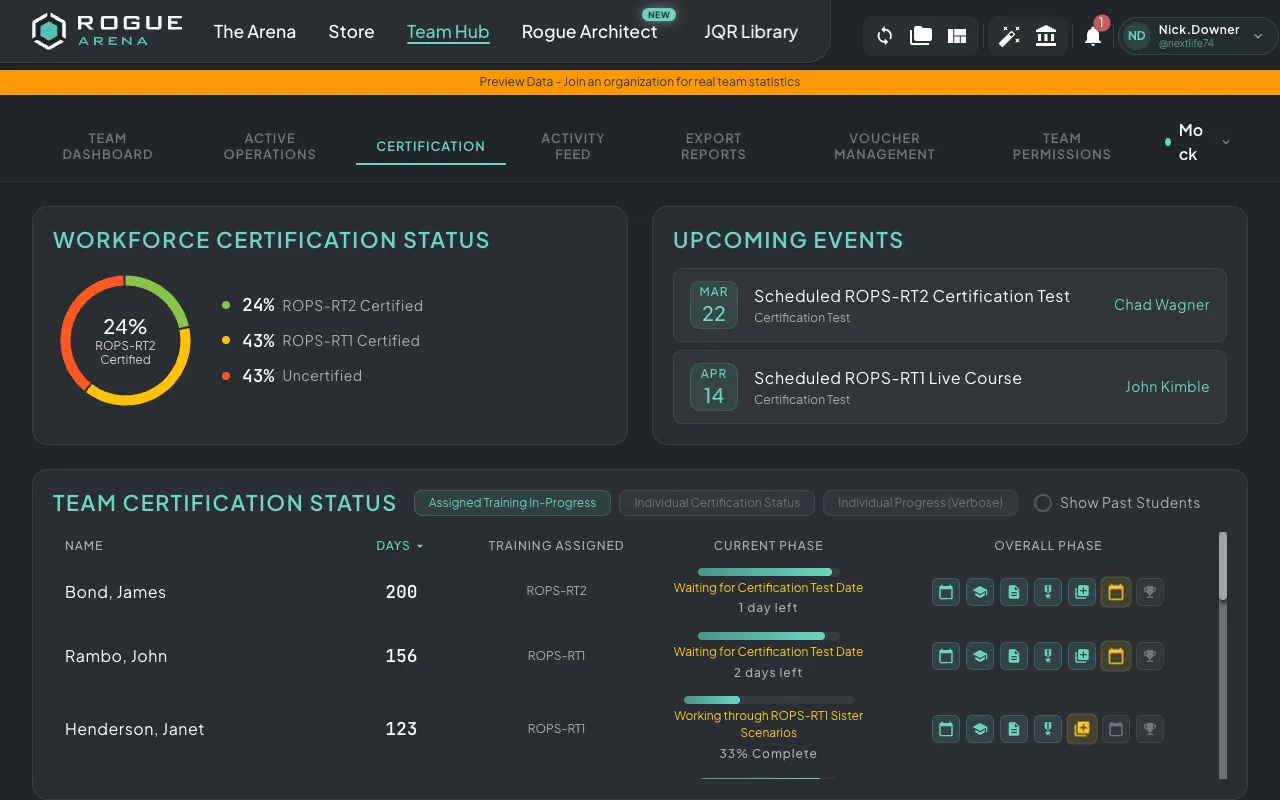
View Modes
Section titled “View Modes”The certification dashboard offers three different views:
Training View
Section titled “Training View”The default view shows a table of all team members with their training status:
- Name — Team member’s name
- Days Assigned — How long they’ve been assigned to their current training
- Training Progress — Percentage completion of their assigned course
- Current Phase — Where they are in the training pipeline
You can sort by any column to quickly find who needs attention.
Certification View
Section titled “Certification View”Switch to the certification view to see:
- Certifications obtained by each team member
- Upcoming certification due dates
- Progress through certification phases:
- Registration — Signed up for the certification
- Lab Completion — Completed all lab requirements
- Certificate of Completion — Received course completion certificate
- Certification Test — Scheduled or completed the proctored exam
- Certified — Passed the exam and received certification
Verbose View
Section titled “Verbose View”The verbose view provides a detailed per-course breakdown showing:
- Individual scenario completion
- Video training hours completed
- Lab (VM) hours logged
- Granular progress metrics per training module
Past Students
Section titled “Past Students”Toggle the Past Students option to include team members who have previously completed or left training programs. This is useful for tracking historical certification data and renewal timelines.
Upcoming Events
Section titled “Upcoming Events”A sidebar section shows upcoming certification exams and team events, helping you plan around important dates.